Rotation Builder Guide
User Guide
Settings
The Settings panel on the right defines your starting state. Select your gear, perks, prayers, stats, buffs, familiars, etc.
Adding Abilities
Select a combat style tab (1 Ranged, 2 Magic, 3 Melee, 4 Necromancy, 5 Defence) to see available abilities.
Left click to add an ability to the next free slot on the bar. You can also drag abilities from the panel onto a specific tick. To remove an ability, right click it on the bar.
Filtering Abilities & Gear
Both the ability panel and gear dropdowns have a filter toggle that cycles between Popular, Owned, and All.
- Popular — shows commonly used abilities and gear (the default).
- Owned — shows only the items you've marked as owned. This lets you quickly filter to just your gear.
- All — shows everything in the game.
To manage which items you own, open the Keybind Configuration modal. Each ability and gear item has a checkbox to mark it as owned. Use the Own All and Unown All buttons to bulk-select items in the current tab. Your owned items are saved to your browser and persist between sessions.
For gear, you can also right click any equipped slot to quickly unequip it (set to None).
Reading the Results
As you build your rotation, the calculator updates automatically. Buffs appear as coloured bars below the timeline. Stacks show as icons with numeric values. Cooldowns are shown as small icons on the tick an ability comes off cooldown. Adrenaline is tracked tick by tick.
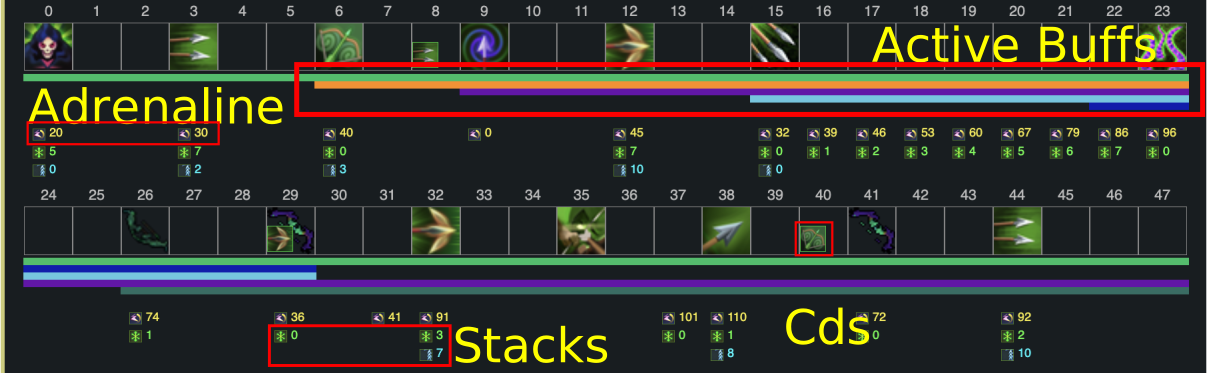
The total damage is displayed at the top of the page, broken down by source: ability damage, poison damage (if using Cinderbane Gloves or weapon poison), familiar damage, and dreadnip damage. The damage plot below the bar shows cumulative damage over time with each source as a separate line.
Click any tick on the bar to open the extra actions panel, which also shows a per-tick damage breakdown, active buffs, and stack values at that point in the rotation.
Tool Modes
There are four tool modes, switchable via the toolbar or keyboard shortcuts:
Regular (r)
Default mode. Left click to add abilities, right click to remove, and drag to reorder.
Stall (s)
Left click an ability to select it, then left click a tick on the bar to place the ability.
Click an existing stall to remove it. Channelled abilities cannot be stalled.
Null (n)
Left click to mark a tick as nulled.
Nulled ticks deal 0 damage but still apply buffs, stacks, and adrenaline as normal —
useful for simulating boss phase transitions or prebuilding on dummies.
Left click a nulled tick again to un-null it.
Insert (i)
Left click to insert ticks into a rotation, moving everything afterwards to the right.
Right click to delete ticks in a rotation, moving everything afterwards to the left.
Extra Actions
Click any tick on the bar to open the extra actions panel. This gives you access to off-GCD abilities (Ingenuity of the Humans, Limitless, prayers, Surge, Escape, etc.), consumables (adrenaline potions, Spiritual Prayer, Vulnerability Bomb), and gear swaps (weapons, armour, Essence of Finality amulets).
Each tick has up to 12 extra action slots. Add items by left clicking and remove them by right clicking. Press space to close the panel. The extra actions panel also shows the Info tab with per-tick damage breakdown, active buffs, and stack values.
Familiars
Select a combat familiar in settings (Ripper Demon, Kal'gerion Demon, or Steel Titan). The familiar attacks automatically at fixed intervals based on its attack rate.
If scrolls are enabled, the familiar uses its special attack whenever it has enough spec points, otherwise it falls back to a regular auto-attack. Spec points start at 60 and regenerate at ~0.3 points/tick. This is boosted by Summoning Renewal, Prism of Restoration, Spirit Cape (20% scroll cost reduction), and Spirit Weed Incense.
Familiars stop attacking after the last ability in your rotation. Their damage is tracked separately in the damage breakdown and plot.
Dreadnips
Deploy a dreadnip by adding it via the extra actions panel on any tick. Once deployed, it attacks every 4 ticks for up to 45 seconds (75 ticks, max 18 attacks), then expires. A cooldown timer shows when it will run out.
Dreadnip hit chance is calculated against the selected boss preset (defence, armour, and affinities). If no boss is selected, it assumes 100% accuracy. Dreadnips also stop attacking after your last ability.
Poison
Enable weapon poison in settings to include poison damage in your rotation analysis. Poison damage scales with Bik arrow stacks when using ranged. It is tracked as a separate damage source in both the total breakdown and the damage plot.
Boss Presets
Select a boss preset in settings to apply its defence level, armour rating, and style affinities. This affects your familiar and dreadnip accuracy, but not your accuracy (yet).
Some bosses support enrage scaling (Telos, Araxxor, Arch-Glacor) — use the enrage slider to adjust the boss's stats and HP accordingly.
Keybinds
Open the keybind configuration modal to assign keyboard keys to abilities, gear swaps, and consumables. Once configured, use the keypress output modal to view your rotation in two ways:
- Sequence — shows the key presses for each tick in order, useful for practising your rotation.
- Keyboard — a visual keyboard layout highlighting which keys have abilities bound, showing the ability icons on each key.
Save & Load
Save your rotation and settings to a named slot using the save/load panel. Rotations are stored in your browser's local storage and persist between sessions. You can maintain multiple saved rotations and switch between them.
- r: Regular tool
- s: Stall tool
- n: Null tool
- i: Insert tool
- 1: Ranged
- 2: Magic
- 3: Melee
- 4: Necromancy
- 5: Defence
- space: Close extra actions panel
How accurate is the damage calculation?
Pretty accurate! A few things are impossible to reasonably calculate exactly, but for the most part we aim to be more or less 100%. If you do find anything wrong, please let us know in the Discord.
Which combat styles are supported?
Ranged is the most polished style with near-complete gear interactions and buff support. Magic, Melee, and Necromancy all work for core rotations but are missing some gear interactions and niche buffs. If you find something that's not working or not implemented, please let us know in the Discord.
Known limitations:
- Player hit chance is not yet calculated from boss defence/armour — you set it manually. Familiar and dreadnip accuracy are calculated from boss presets.
- Multi-hit abilities (e.g. Greater Ricochet, Wild Magic) resolve all hits on the same tick rather than spreading them across their actual hit timings.
- Some necromancy interactions are still being refined.
- Off-style gear accuracy penalties (e.g. wearing melee armour while maging) are not modelled.
How do I report bugs or suggest features?
Join the RSA Discord server or submit issues through our GitHub repository.